Edwards Signaling Products
Edwards Message Center Network Configurations
Edwards Message centers may be networked into an overall company communications system.
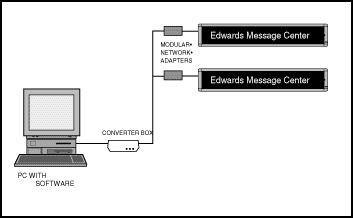 |
Standard Wire Networking Utilizing an RS485 <> RS232 converter box and a PC with the Edwards Message Center software you may configure a company wide communications annunciation system. |
|
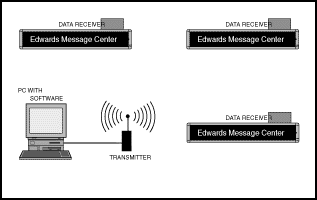
Wireless Networking: Install an optional on-site wireless transmitter on the PC with the Edwards Message Center Software and data receivers on the Edwards Message Centers to create a wireless network up to a mile in distance. |
 |
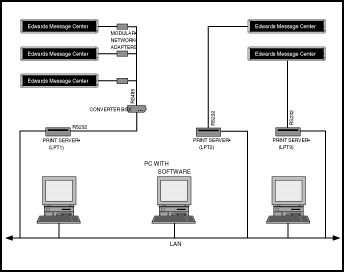 |
Use your Existing PC Network Utilize your existing PC Ethernet network to configure an Edwards Message Center system. Install one or more optional Edwards specified serial print server on your current Ethernet network to communicate with your company wide Edwards Message Center systems. |
|
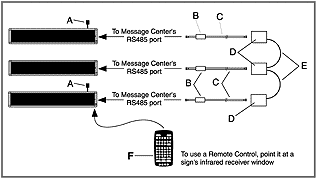
Network Message Centers without a PC Don't have a PC to control your Edwards Message Centers? Just connect your message centers using the RS485 cables and modular adapters and control them all with the supplied 54 key-pad IR. remote control device. |
 |
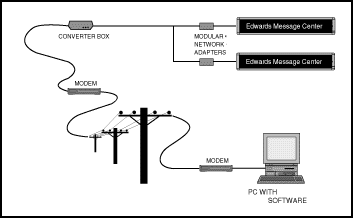 |
Connect via Telephone Lines: Connect your Edwards Message Center systems through standard telephone lines using a modem at each end. |